
Traefik

What is Traefik?
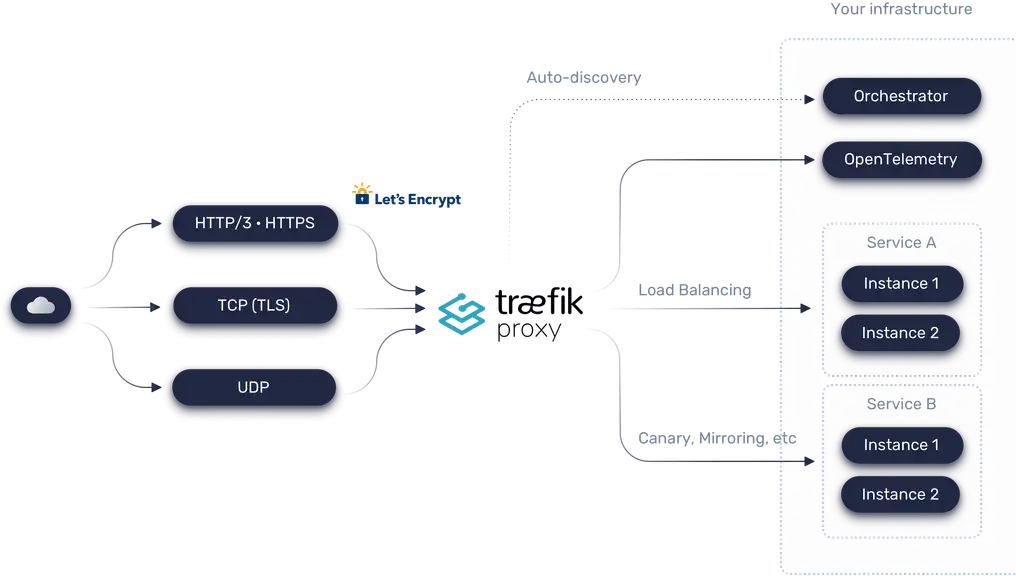
Traefik is a leading modern open source reverse proxy and ingress controller that makes deploying services and APIs easy. Traefik integrates with your existing infrastructure components and configures itself automatically and dynamically.
Simplified Operation, Complex Deployments
Traefik is designed to be as simple as possible to operate, but capable of handling large, highly-complex deployments across a wide range of environments and protocols in public, private, and hybrid clouds.
Enhanced with Powerful Middleware Suite
Traefik also comes with a powerful set of middlewares that enhance its capabilities to include load balancing, API gateway, orchestrator ingress, and more.


So how to set up ?
We will explore how to set up Traefik in a Dockerized environment.
services:
  reverse-proxy:
    # The official v3 Traefik docker image
    image: traefik:v3.3
    # Enables the web UI and tells Traefik to listen to docker
    command:
      --api.insecure=true
      --providers.docker
      --entrypoints.http.address=:80

    ports:
      # The HTTP port
      - "80:80"
      # The Web UI (enabled by --api.insecure=true)
      - "8081:8080"
    volumes:
      # So that Traefik can listen to the Docker events
      - /var/run/docker.sock:/var/run/docker.sock
This is the format you need to follow: Docker. Your container can watch events such as a new container being created, and read the tags for each container.
- /var/run/docker.sock:/var/run/docker.sock
you can up your docker like docker compose up you can take a look to the dashboard http://localhost:8081
okay now add your first application
  ipinfo:
    image: peterdavehello/ipinfo.tw:latest
    restart: unless-stopped
    expose:
      - 8080

    labels:
      traefik.enable: true
      traefik.http.routers.ipinfo.entrypoints: http
      traefik.http.routers.ipinfo.rule: Host(`ipinfo.localhost`)
      traefik.http.services.ipinfo.loadbalancer.server.port: 8080
      traefik.http.routers.ipinfo.service: ipinfo
Now you can open your browser and go one http://ipinfo.localhost
If you need to add a service, it's not necessary for your service to be included in the same Docker-compose.yaml.
You need to change ipinfo by a new service name and define the port 8080 by a port expose from your service.
Remember ports and expose is not the same! Docker ports it biding a internal port to external port, expose it only define what port is used inside docker is userfole for traefik to know how to root network
Conclusion
You know how to use simple case usage of reverse proxy with traefik the next time we will see who to define a domain name to access of internal service.
thank you, And register you to have to be notified of the next publication !